For HR: a hybrid working policy people follow
What is recorded, who can see it, and the words to tell your staff.
What HR needs to know
The visibility model, in plain words, before anybody asks you about it in a consultation.
Who can see whose days
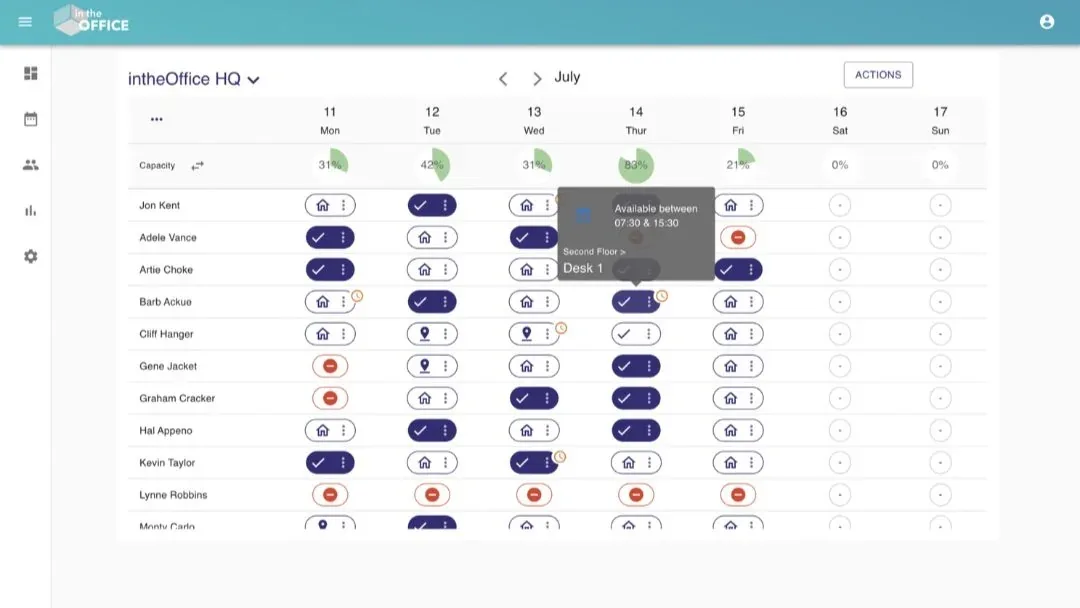
Everyone at your office sees the same grid: a row for each person, and a chip for each day reading In the office, Working from home or Away. That is the whole of what colleagues see about one another, and it is the point of the thing.
What colleagues cannot see: Reporting, the people list and Settings open for admins only, so nobody can pull a report on a colleague. The Live Health & Safety Register shows a tick against a name for anyone who has checked in, and never a time. Another office is hidden from the filter until an admin publishes its schedule, and can be hidden from named sites after that.
Who can change a day: you set your own. A company admin, or a Group admin for their own team, can set a day for someone else, which is how an absence gets recorded when the person is not there to record it. Nobody else can change another person’s day.
What is recorded, and why
For each person: a name, a work email address, the status set for each day, anything booked, the weekly Routine, any Groups and any health and safety roles they have added. A profile is a name and a work email address. There is no home address, no telephone number, no date of birth and no employment record.
If you use Scan In, the QR poster by the door, the time somebody scanned in and out is recorded as well. It is read back through the check-in and check-out log, an export inside Reporting, so it is admin only. On the Register, on the day, it is still a tick and not a time.
Why each of them: the capacity gauge needs the day, the desk needs the booking, and the Register needs to know who is in the building when the alarm goes. Application data is held in Google Cloud data centres in London, Belgium and Frankfurt; some older background processing still runs outside them, which is why we do not claim UK and EU only processing, and the IT brief says so in full.
Your policy, in numbers
Reporting answers the question a hybrid working policy actually raises, which is whether it is being followed, by location and over any period you choose. How many people were in on each day, which days are busiest as a chart, the totals for each status, and the same again per office, because each office is its own location with its own numbers.
Every view exports to CSV, so the policy review runs on your own numbers rather than on a survey. Reporting is admin only.
Health and safety, and who holds the roles
The Register lists everyone on site now, staff and visitors on one list, and exports, so the roll-call happens in the car park rather than at the noticeboard. It is open to everyone on purpose: in an evacuation the person holding the phone is whoever is holding it.
People add their own roles to their profile, Health and Safety Officer, First Aid Responder, Office Key Holder or Fire Marshal, and those show as icons beside their name, so anyone can find the nearest first aider without asking. Nobody is given a role behind their back, and a role grants no permissions.
Records that survive
A visitor who has arrived cannot be edited or deleted by anyone, including an admin, because deleting them would destroy the record that they were on site. Before they arrive, their host or an admin can change or remove them.
An office you stop using is archived rather than deleted, so its schedule, its spaces and its visitor history stay with it and it can be brought back.
Whether a past day can be edited at all is your decision, set per office and separately for admins and for everyone else: always on, off until it is switched on each time, on for admins at their own site, or disabled altogether. Where the record of a past day matters, it stays what it was.
Everything exports to CSV whenever you want: the schedule, the Routines, the check-in and check-out log, the reporting numbers, the visitors, the Register and the people list. When somebody moves on, an admin removes them from the account, so export anything you are required to keep before that.
It is not a people-tracking tool
Reporting can show one person’s days as well as the office totals, so the honest answer is not that the data does not exist, but that it is narrow and it is admin only. It holds the day each person set and, where you use the QR poster, when they arrived and left.
It does not measure hours worked. It does not know where anyone is once they are in the building: there is no app on the phone, no location permission and no tracking of any kind, and the QR code is an ordinary web page opened with the camera. It reads no calendars, no email and no documents. There is no productivity score and no screen anywhere that ranks people.
Attendance is a poor proxy for how a person is, so intheOffice is not built to read it that way, and nothing on this page suggests you should.
Will people use it
At Creditsafe, across four offices in three countries, over 100 people signed themselves in with Microsoft in the first two days, and over 72% of the office was on it within two weeks.
What did that was not the software. It was an announcement that said why, a go-live day in the diary, and an office manager who printed the poster. The plan for those two weeks is written out, and the wording for the announcement is in the pack below.
The wording for point two is written for you, on this page and as a PDF: the words to tell your staff, or download the pack. The technical answers, for the colleague who will ask them, are on the IT page, and the rollout is set out in your first two weeks.
The words to tell your staff
Fill in the details below and the words update as you type. Copy the email and send it; copy the detail for your intranet or to attach. They describe what intheOffice does and does not do, in the language a colleague who has never heard of it will read once.
Whatever you type here stays in your browser. It is not saved and it is not sent to us; it only fills in the words below.
The email
From [date] we are using intheOffice to keep track of who is working where. Each week you set a status for each day, In the office, Working from home or Away, and you can see the same for everyone else. If your pattern is the same most weeks, set it once as a Routine and it fills itself in.
We are doing this for three reasons: so you can see who else will be in before you decide to travel, so there is a desk for you when you get here, and so we know who is in the building if the alarm goes.
You book your desk, a meeting room or a parking space for the day at the same time as you set it.
There is a QR code by the door. Scanning it with your phone marks you as here, and scanning it again on the way out marks you as gone.
It is not a way of checking up on anyone. Nobody is timed, nobody is scored, and there is no measure of work in it at all. If anything below is not what you expected, tell [name] and we will sort it out.
Check these words against your own privacy notice before they go out. What you keep, and for how long, is your decision and not ours, and this is not legal advice.
The detail, to attach or put on your intranet
The same words, for the colleague who wants to know more than the email says.
What is recorded
- Your name and your work email address. That is the whole of your profile.
- The status you set for each day, and any weekly Routine you set.
- Anything you book: a desk, a meeting room, a parking space, a locker.
- The office you belong to, and any Groups you are in.
- Any health and safety role you add to your own profile.
- The time you scanned in, and the time you scanned out.
Who can see it
- Colleagues see the status you set for each day, and what you have booked. Nothing else about you.
- On the register of who is in the building, a name carries a tick once somebody has checked in. It never shows a time.
- Administrators, which is [names or roles], can also see the office totals and export them, and can see one person’s days over a period.
- Another office cannot see your schedule unless an administrator has published it to the whole company.
- Nobody outside [company] sees the schedule. intheOffice holds the data in order to run the service for us, on our instructions, under the agreement linked below.
What it does not do
- It does not measure hours worked, or anything else about your work.
- It does not know where you are. There is no app on your phone, no location permission and no tracking; the QR code is an ordinary web page opened with the camera.
- It does not read your calendar, your email or your documents.
- It has no productivity score and no league table of any kind.
The questions people ask
- Can my manager see what time I arrived?
- If we use the QR poster, the times you scan are recorded and an administrator can export them. On the register on the day, your name carries a tick and never a time. Nothing is calculated from the times; they are there so we know who is in the building.
- Can colleagues see more about me than I can see about them?
- No. Everyone sees the same grid of people against days. Administrators see more than that, and the administrators are [names or roles].
- I set a day wrongly. Can I change it?
- Today and the days ahead, always. Whether a day that has passed can be changed is a setting for our office. At the moment, [setting]. Ask [name] if you need a past day corrected.
- Do I have to give it my phone number or my home address?
- No, and there is nowhere to put them. Your profile is a name and a work email address.
- What happens to my record when I move on?
- An administrator removes you from the account. [Company] keeps whatever the retention policy requires, and nothing else.
- Where is the data held, and who has it?
- intheOffice is a UK company. Application data is held in Google Cloud data centres in London, Belgium and Frankfurt. Their privacy policy is at www.intheoffice.io/legal/privacy/ and the agreement we hold with them is at www.intheoffice.io/legal/dpa/. The full technical detail, including the parts that are not in the UK and the EU, is at www.intheoffice.io/for/it/.
- What if I do not want to use it?
- Talk to [name]. Somebody else can set your day for you, but then the grid says where you are without you having had a say in it, which is worse for you than setting it yourself.
Version 1 October 2026. PDF, 3 pages, the same words as above, so you can attach it to a policy or paste it into an email.
Why use intheOffice
At a glance
intheOffice was designed from the ground up to be more than desk booking, space management and visitor management software. We started with the problems flexible working created for people, and built the features from there.
- Dedicated hybrid working software, which is a cultural message in itself
- Hybrid working policy adherence, office by office
- Supports talent acquisition and retention
- Colleagues’ desk bookings visible, so people can sit together
- Favourite and busiest days, shown as a chart
- Daily statuses and weekly Routines, with the multi-week view
- Office utilisation data for the travel and carbon questions
- Microsoft sign-in and the Microsoft Teams app, so adoption is one click
- No set-up fees and no card needed
Available across all of your devices.
Your hybrid working policy
- Policy adherence
- In a few seconds, see where people are actually working, whether in the office, at home, offsite or away, office by office and over any period.
- Favourite days
- When is the office busiest, and when is it quiet? The favourite-days chart answers it, by status, by office and by period, which is what you need before you plan a team day or a company event.
Culture and talent
- The message it sends
- Running dedicated software for hybrid working says that it is part of how this organisation works, rather than something being tolerated until it goes away.
- Retention
- A two-year study of 1,612 staff at Trip.com, published in Nature in June 2024 (Bloom, Han and Liang), found that two days a week at home cut quit rates by a third and left performance reviews unchanged.
- Acquisition
- A published, working pattern widens the pool: people who do not live locally, and people with caring responsibilities, can apply for a job whose shape they can see.
For the people who manage people
- Where is everyone sitting
- The floor plan shows people’s initials on the desks and rooms they have booked, so a team can arrange to sit together, and a favourite desk books again in one tap.
- Last-minute changes
- From any signed-in device, people can book a desk, a parking space or a meeting room for an off-the-cuff day in the office, and can check who else will be there before they set off.
- The space question
- Forbes research says the office space a business needs can fall by 30% under hybrid working. Reporting gives you the number for your own office rather than somebody else’s.
- The travel question
- Knight Frank puts the carbon of a full-time office worker’s commuting at about 43.5kg a week. Fewer wasted journeys, because people could see the office was full before they set off, is the part of that intheOffice can affect.
How else intheOffice helps HR teams
- Groups
- Teams inside an office, so a 200-person schedule is readable, and a team lead can be given their own Group to manage without company-wide admin rights.
- Office capacity
- Set the capacity as a headcount, a percentage or the number of desks, and the gauge above each day turns amber and then red as it fills, so a busy Thursday is visible on Monday.
- Microsoft sign-in and Teams
- People sign in with their Microsoft account, and intheOffice runs as a tab in Microsoft Teams, so setting a day does not mean opening another tool.
- People come and go
- Add or remove people as they join and go: invite by email one at a time, import a list from a spreadsheet, or sync the names from Microsoft 365.
- Support
- Support comes from the people who built intheOffice, led by the founder.
Hybrid research from intheOffice
Four short reports, as PDFs. They and the guides are on the guides and research page.
Support comes from the people who built intheOffice, led by the founder. What is held and where, in full, is on the IT page, the Data Processing Agreement and the privacy policy.