What the office costs, and what the data says
For the people who sign off the lease and the invoice.
Who actually came in, how full the office was, and what intheOffice has cost so far this month, before the invoice arrives.
Creditsafe put 100 people on it in two days.
Do we need this much space?
A lease review turns on one number: how much of the office is used, and when.
Scheduling records who is in, Desk & Space Booking records what they book, and Reporting turns both into numbers you can put in front of a landlord or a board. It is what happened, not what a survey says people intend to do.
- Capacity. Each office carries a capacity, set as a headcount, a percentage or the number of desks. The gauge above every day shows how full that day will be before it happens.
- Utilisation. Desk and room utilisation over any date range, so the question is how much of the space is used rather than how much of it was booked once.
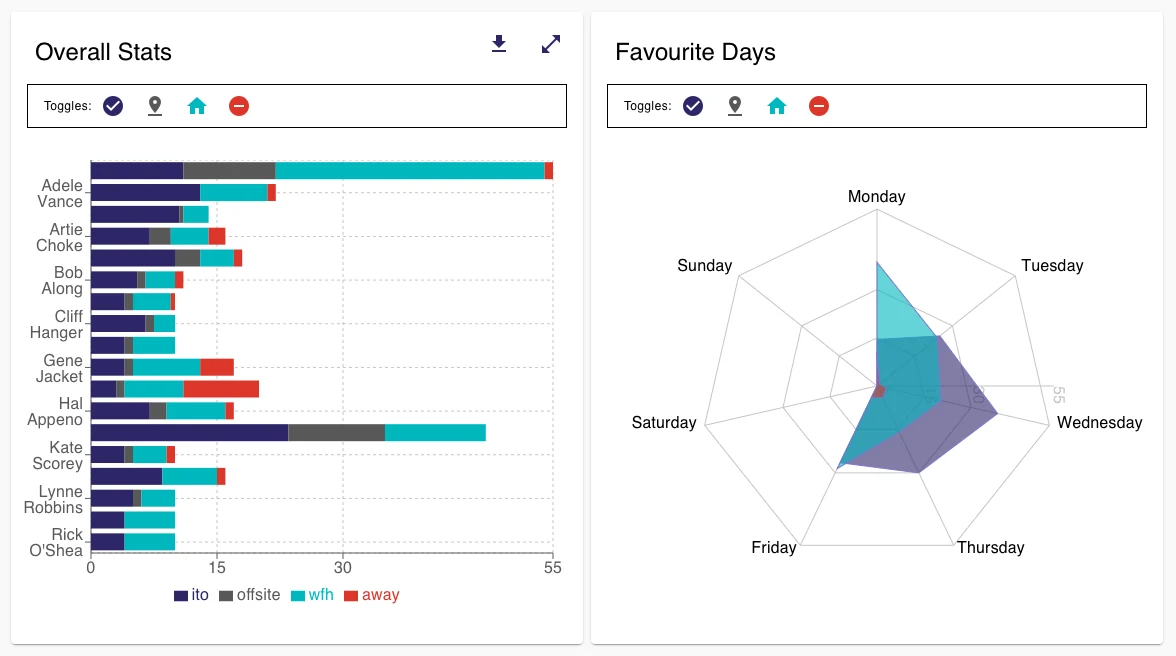
- Peak days. The favourite-days chart shows which days the office fills and which days it is empty, so the office is sized for the busy day and not for the average.
- Planned against actual. Statuses and Routines say who meant to be in. The check-in and check-out log from Scan In says who was. The gap between the two is the number a landlord has never seen.
- By location. Every number reads for one office or across all of them, so a portfolio is compared site by site.
- Into the lease review. The charts are on screen, and the schedule, the Routines and the check-in and check-out log export to CSV. The file goes into the review as it is.
What it costs, and when you can see it
From £0.95 per person per month +VAT, with no contract and no card to start. You pay only for the days each person is on your account.
Scheduling £0.97, Desk & Space Booking £1.19 and Visitor Management £0.95, each per person per month, plus VAT. Advanced Scheduling is +£1.09 on top of Scheduling. For Reporting, talk to us. You pay for the people on your account, for each module you have switched on, and you can switch a module off at any time.
The bill is not a surprise at the end of the month. The Subscription tab in Settings shows the current month as one row for each day: the date, the modules that were switched on that day, the number of people on the account and what that day cost, with the running total for the month, plus VAT, at the foot of the table. Last month's invoice sits underneath it, built from the same rows.
There is no seat minimum and no block of licences to buy. You pay for the people on your account, so when the headcount changes the next day's row changes with it.
What operations and finance ask us
Can we see utilisation?
Attendance by day and by person over any date range, office against home against away, desk and room utilisation, and the days the office fills. Read it for one location or for all of them, look at the charts on screen, or take the numbers out as CSV.
We have several sites.
Each location has its own capacity, its own spaces and its own rules, with one people list across all of them. Reporting reads a single site or the whole portfolio, and a person who moves between offices is counted where they scanned in.
Does it work with what we have?
Sign in with Microsoft, import your people from Microsoft 365, and run intheOffice as a tab in Microsoft Teams. People and spaces import from a spreadsheet, a read-only API pulls the schedule into a dashboard of your own, and it runs in a browser on any device. Nothing to install, and no hardware to buy beyond a tablet at reception if you want one.
What if nobody uses it?
The first two weeks have a plan and a finish line: everyone invited, four in five with at least one week set, the module switched on and used by someone other than the admin, and a running total that is the number you expected. If a module is not being used, switch it off and the daily charge for it stops.
Can we turn it off?
Switch a module off the same day you decide you do not need it, and the daily charge for it stops with it. There is no contract to end, and the schedule, the bookings and the visitor records export whenever you ask for them.